打jar包
更换打包方式
不使用springboot自带的打包插件进行打包,因为springboot打包插件打出来的jar包第一目录为Boot-INF,会导致无法引用。
更改为maven打包方式:
//pom文件
<build>
    <finalName>${project.artifactId}</finalName>
    <plugins>
        <plugin>
            <groupId>org.apache.maven.plugins</groupId>
            <artifactId>maven-compiler-plugin</artifactId>
            <configuration>
                <source>1.8</source> <!--指明源码用的Jdk版本-->
                <target>1.8</target> <!--指明打包后的Jdk版本-->
            </configuration>
        </plugin>
    </plugins>
</build>
整个pom.xml:
<?xml version="1.0" encoding="UTF-8"?>
<project xmlns="http://maven.apache.org/POM/4.0.0"
         xmlns:xsi="http://www.w3.org/2001/XMLSchema-instance"
         xsi:schemaLocation="http://maven.apache.org/POM/4.0.0 http://maven.apache.org/xsd/maven-4.0.0.xsd">
    <modelVersion>4.0.0</modelVersion>

    <groupId>org.example</groupId>
    <artifactId>untitled2</artifactId>
    <version>1.0-SNAPSHOT</version>

    <properties>
        <maven.compiler.source>8</maven.compiler.source>
        <maven.compiler.target>8</maven.compiler.target>
        <project.build.sourceEncoding>UTF-8</project.build.sourceEncoding>
    </properties>

    <parent>
        <groupId>org.springframework.boot</groupId>
        <artifactId>spring-boot-starter-parent</artifactId>
        <version>2.7.5</version>
        <relativePath/> <!-- lookup parent from repository -->
    </parent>

    <dependencies>
    //引入@Service注解
        <dependency>
            <groupId>org.springframework.boot</groupId>
            <artifactId>spring-boot-starter-web</artifactId>
        </dependency>
    </dependencies>
    <build>
        <finalName>${project.artifactId}</finalName>
        <plugins>
            <plugin>
                <groupId>org.apache.maven.plugins</groupId>
                <artifactId>maven-compiler-plugin</artifactId>
                <configuration>
                    <source>1.8</source> <!--指明源码用的Jdk版本-->
                    <target>1.8</target> <!--指明打包后的Jdk版本-->
                    <skip>true</skip>
                </configuration>

            </plugin>
        </plugins>
    </build>

</project>
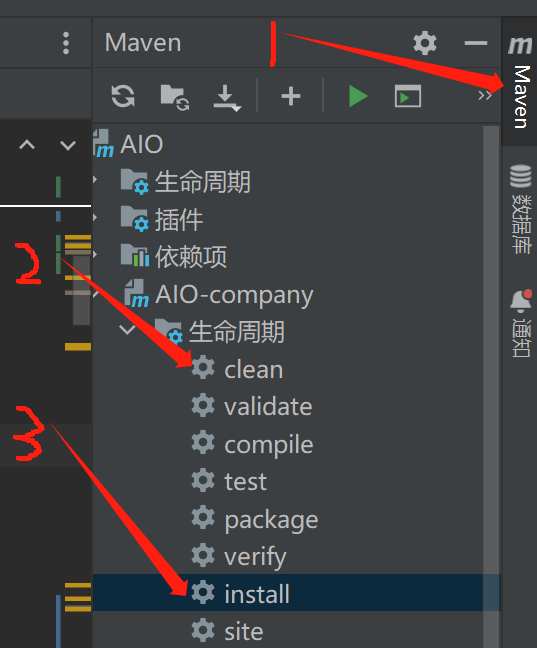
打包
先clean再install
示例
写一个简单的类和方法,例如a + b函数,注意加上@Service等注解便于调用者可以扫描到类。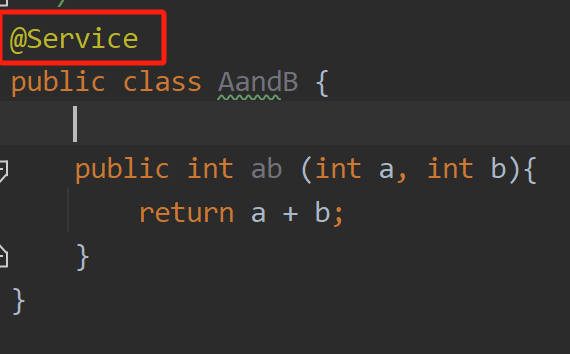
调用jar包
配置pom
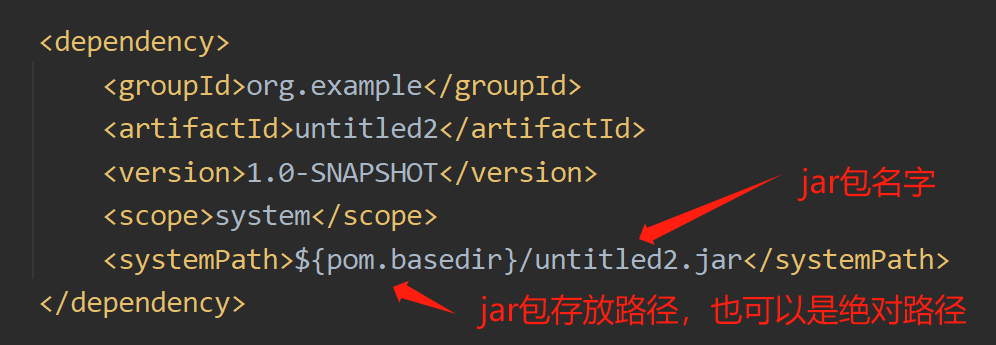
<dependency>
    <groupId>org.example</groupId>
    <artifactId>untitled2</artifactId>
    <version>1.0-SNAPSHOT</version>
    <scope>system</scope>
    <systemPath>${pom.basedir}/untitled2.jar</systemPath>
</dependency>
再加上:
 <build>
    <plugins>
        <plugin>
            <groupId>org.springframework.boot</groupId>
            <artifactId>spring-boot-maven-plugin</artifactId>
            <configuration>
                <mainClass>com.shark.aio.AIOCompanyApplication</mainClass>
                <includeSystemScope>true</includeSystemScope>
            </configuration>
        </plugin>
        <plugin>
            <groupId>org.apache.maven.plugins</groupId>
            <artifactId>maven-compiler-plugin</artifactId>
            <configuration>
                <source>8</source>
                <target>8</target>
                <encoding>utf-8</encoding>
            </configuration>
        </plugin>
    </plugins>
</build>
全部pom.xml文件:
<?xml version="1.0" encoding="UTF-8"?>
<project xmlns="http://maven.apache.org/POM/4.0.0"
         xmlns:xsi="http://www.w3.org/2001/XMLSchema-instance"
         xsi:schemaLocation="http://maven.apache.org/POM/4.0.0 http://maven.apache.org/xsd/maven-4.0.0.xsd">
    <parent>
        <artifactId>AIO</artifactId>
        <groupId>com.shark</groupId>
        <version>0.0.1-SNAPSHOT</version>
    </parent>
    <modelVersion>4.0.0</modelVersion>

    <artifactId>AIO-company</artifactId>

    <properties>
        <maven.compiler.source>8</maven.compiler.source>
        <maven.compiler.target>8</maven.compiler.target>
        <project.build.sourceEncoding>UTF-8</project.build.sourceEncoding>
    </properties>

    <dependencies>
        <dependency>
            <groupId>org.example</groupId>
            <artifactId>untitled2</artifactId>
            <version>1.0-SNAPSHOT</version>
            <scope>system</scope>
            <systemPath>${pom.basedir}/untitled2.jar</systemPath>
        </dependency>

    </dependencies>

    <build>
        <plugins>
            <plugin>
                <groupId>org.springframework.boot</groupId>
                <artifactId>spring-boot-maven-plugin</artifactId>
                <configuration>
                    <mainClass>com.shark.aio.AIOCompanyApplication</mainClass>
                    <includeSystemScope>true</includeSystemScope>
                </configuration>
            </plugin>
            <plugin>
                <groupId>org.apache.maven.plugins</groupId>
                <artifactId>maven-compiler-plugin</artifactId>
                <configuration>
                    <source>8</source>
                    <target>8</target>
                    <encoding>utf-8</encoding>
                </configuration>
            </plugin>
        </plugins>
    </build>


</project>
启动类加注解
把类加入bean
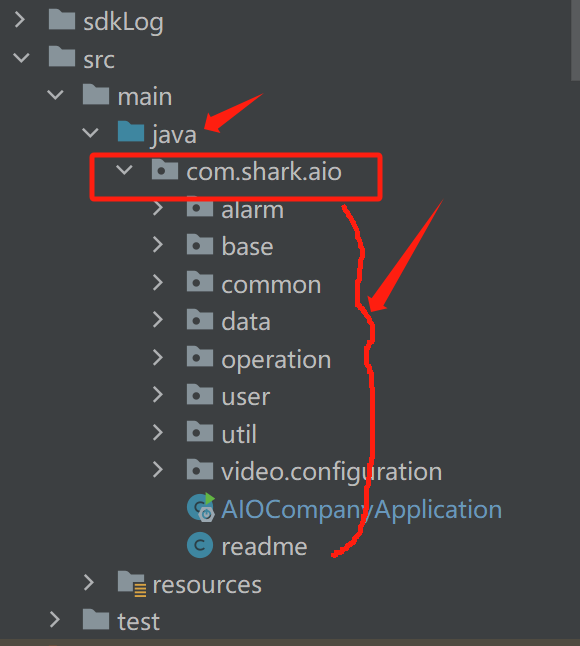
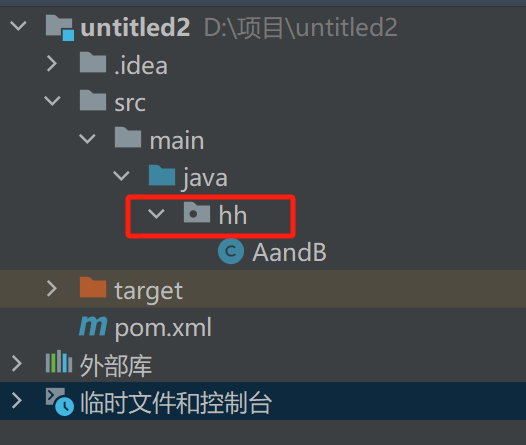
@ComponentScan({"com.shark.aio", "hh"})
- 第一个参数为调用者代码路径,从java开始到分类结束
- 第二个参数为打包者代码路径,从java开始到分类结束
调用
- 可以直接将jar内的类引入容器
- 调用即可
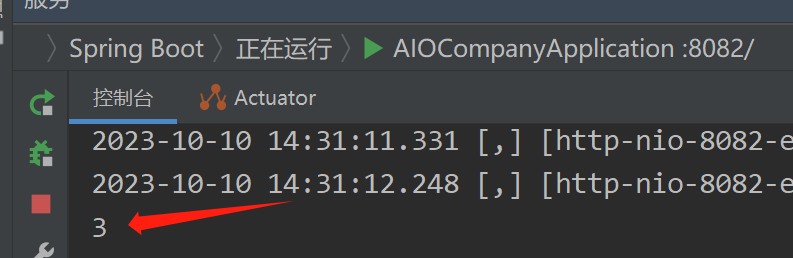
- 成功返回值
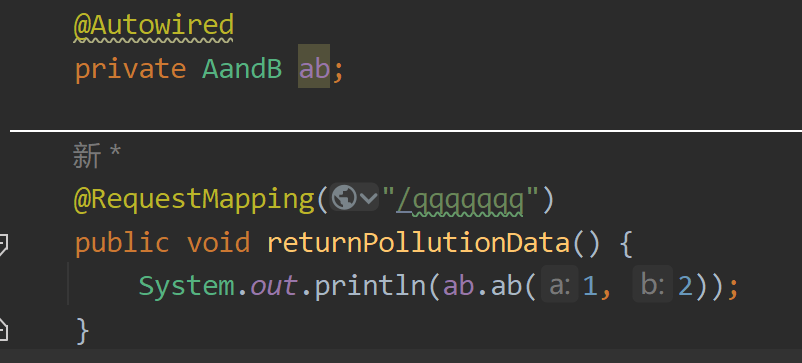
返回结果: